


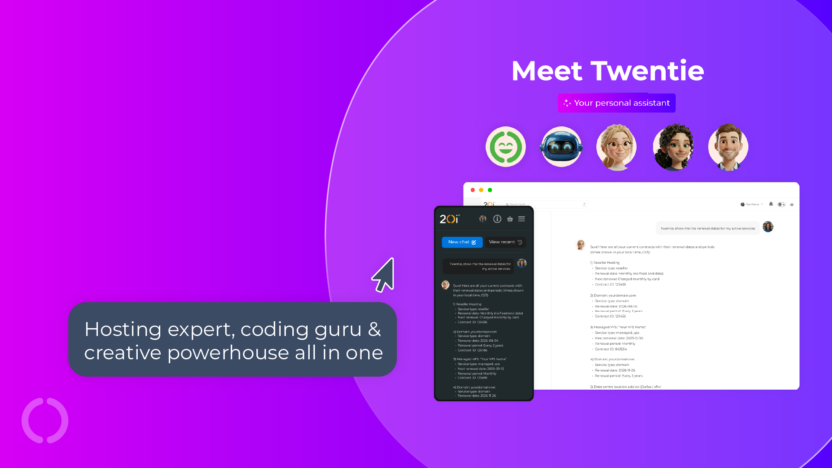
Say hello to Twentie, your powerful personal assistant that’s ready to transform the way you work.
A hosting expert, coding guru and creative powerhouse all in one, Twentie will troubleshoot issues, analyse data, track website performance, diagnose errors and even write/debug code or craft engaging content – all without ever leaving My20i.
- Fully integrated agent that understands your 20i account in real time.
- Creative thinking, statistical reporting & analytical insights on demand.
- Free and unlimited use with no tokens or credits.
- Choose Twentie’s avatar to suit your mood.
- Twentie is automatically multi-lingual and will reply in which ever language you want to chat in.

➡️ Log in to My20i and get started with Twentie, or keep reading to find out more about some of the awesome things you can do…
Account & product ⚙️
Quickly surface information about your account from a single source of truth.
Instantly list product renewal dates, team member access, DNS records, package type quotas and much more without hunting through menus or documentation.
Example prompts:
Show me all the renewal dates for my active services. Are there currently any urgent actions on my customer accounts that need my attention?Summarise the last 100 access entries for [domain name] using the website access logs. Where is the DNS for [domain] currently pointing? Which team members currently have access to My20i and what are their permissions? How do I grant a web developer access to my hosting?Trouble-shooting & solving problems 🎯
Save time searching our support database and get instant answers to account set-up and technical questions. Twentie guides you through each step with clear instructions and direct links to take action.
Dive deeper and query your error logs, uncover plugin issues, and get fixes tailored to you, all explained in natural language.
Example prompts:
Review the PHP configuration for [package] and flag settings that commonly affect performance (memory limit, max execution time, etc.)How do I set up StackMail on my iPhone? Check my error logs and report anything that needs my attention. Do any of my WordPress plugins have errors? If there are errors, tell me how to fix them. List any URLs that have 404 errors on [domain]. Performance 📈
Track performance metrics across your entire account. Twentie helps you understand bandwidth usage, mailbox sizes, WordPress plugin performance and more, giving you fast insights without running manual reports.
Example prompts:
How is our web hosting business going?What can I do to improve the speed and performance of [domain]?How much bandwidth did [domain] use last month and how does that compare to the same period last year? Which WordPress plugins on [domain] are out of date?Have there been any unusual spikes in requests from a specific IP recently? List and analyse all of my databasesData analysis 🤔
Make informed decisions based on real data, not just instinct. Twentie analyses everything from hosting plans and product usage to client behaviour, HostShop revenue and upgrade opportunities.
Whether you want to analyse traffic patterns, identify your power users, reveal upsell opportunities, or audit security, Twentie turns raw numbers into clear, actionable reports.
Example prompts:
How much revenue have I made through HostShop this month and how does that compare to the same period last year? Identify clients who are close to hitting their storage or bandwidth limits. Which bots have accessed my website in the last 100 logs?Which websites are using the most disk space on my VPS?Code debugging 🛠️
As well as giving you instant access to your error logs, you can also paste your code directly into Twentie for instant debugging help. Twentie highlights problems, explains what’s going wrong, and suggests fixes you can apply immediately.
Example prompts:
Refactor the following CSS. Remove unused code, combine redundant selectors, fix overwrites, use shorthand properties where appropriate, and merge media queries. Do not change the visual outcome, but make the code cleaner and more efficient.Here’s my PHP error, what’s causing it and how do I fix it? This JavaScript isn’t running correctly. Can you debug it? Why is my WordPress theme showing this fatal error? Optimise this SQL query for faster performance. Sales & marketing ✍️
Twentie isn’t just technical, it can be creative as well. Ask Twentie to provide some business advice, help write new website copy, tailor your next sales email or generate technical documentation for your customers.
Twentie can also help you identify up-sell and cross-sell opportunities on a package by package basis.
Example prompts:
What should we be charging our customers for the different levels of VPS?Write a privacy policy for my website.List all mailboxes using more than 80% of their storage allowance. Write a short product description for Managed WordPress Hosting aimed at small businesses. Write a Unique Value Proposition for my Web Hosting landing page’s header. How can I check a website for compliance?Give me a detailed website launch technical checklist.Brainstorming ideas 💡
When you need inspiration, Twentie is ready to help. From domain name ideas to campaign brainstorming, content themes or new product concepts.
Example prompts:
Give me 10 domain name ideas for a photography business. Brainstorm blog topics for a web design agency. Create 10 taglines for my hosting business. What’s the best way to position Premium Mailboxes vs standard mailboxes for small business customers, based on what 20i supports?Get started with Twentie
Ready to see what Twentie can do? Log in to My20i today and start exploring a smarter, faster way to manage your hosting.
Whether you’re troubleshooting issues, analysing performance, or looking for fresh ideas, Twentie is here to help you get more done, in less time.