


The objective of DNS poisoning is to redirect users to malicious or unintended websites by injecting false DNS records into the DNS cache or responses.
This attack compromises the integrity of the DNS system, which is responsible for translating domain names into IP addresses.
DNS spoofing and DNS poisoning are closely related concepts in cybersecurity, often used interchangeably, but they refer to different aspects of the same type of attack.
DNS spoofing is the technique used by attackers to forge DNS responses, tricking a system into accepting false information about a domain name’s IP address.
When successful, this leads to DNS poisoning, which is the result of the spoofing attack, where the malicious data is stored in the DNS cache of a resolver. This poisoned cache causes users to be redirected to fraudulent websites, even when they enter the correct web address.
In this article, we will be exploring how DNS works, what DNS poisoning & hijacking is and how to protect yourself against it.
How does DNS work?
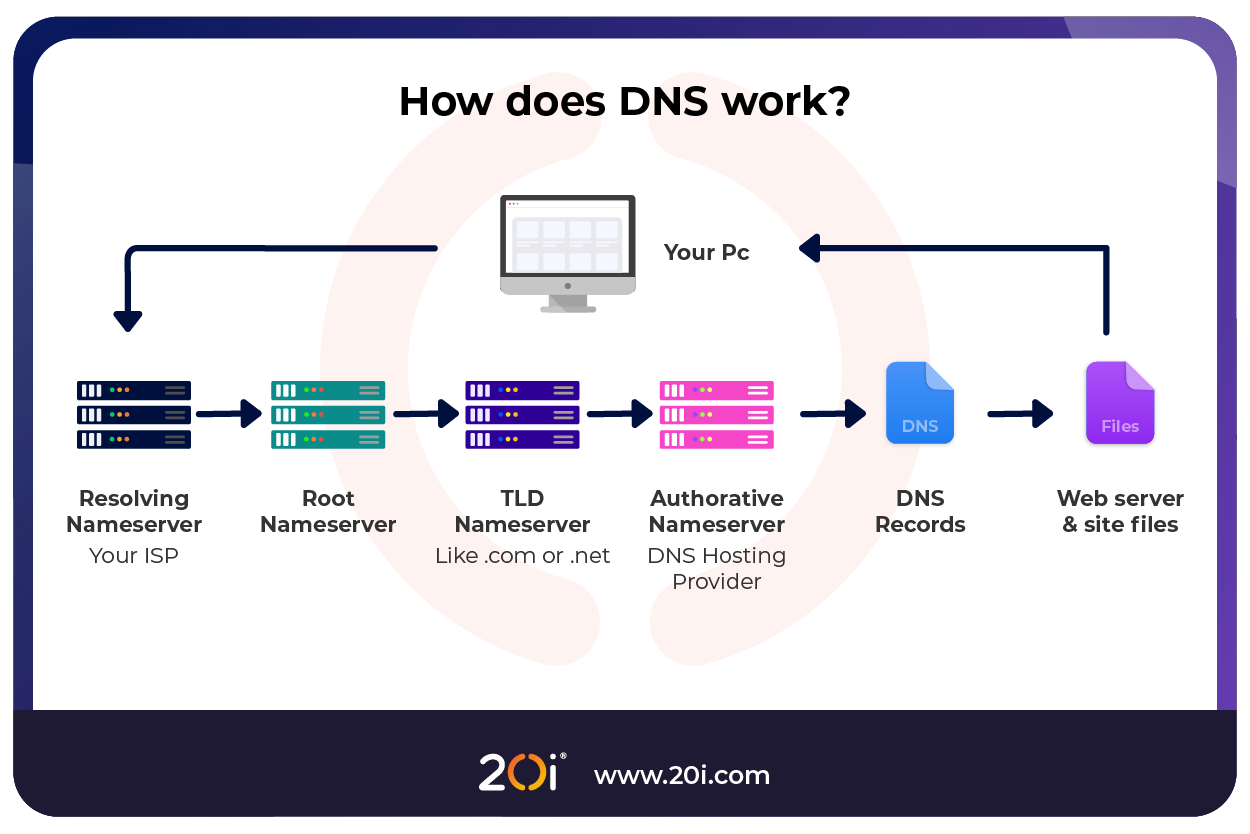
When visiting a website over the internet, your computer must know the IP address of the web server the website is hosted on, in order to locate the content.
As IP addresses are complex, liable to change and not easy to remember, the DNS (Domain Name System) was introduced. Without DNS, you would need to remember the IP addresses of the websites you’d like to visit (e.g 185.151.30.182).
This system has many different DNS records for different purposes. One such record is the DNS ‘A’ record, which maps domain names such as 20i-demo.com to IPv4 addresses like 185.151.30.182.
We have a support article explaining the different types of DNS records and what they are used for.
- User Enters a Domain Name
You type ‘example.com’ into a browser.
- Check Local DNS Cache
Your device first checks its local DNS cache to see if it already knows the IP address for the domain and if found, it uses that address immediately. If not found it sends a DNS query to a DNS resolver, typically operated by your internet service provider (ISP) or a public DNS provider like Google.
- Query Recursive DNS Resolver
The DNS resolver acts on your behalf. If it doesn’t have the answer cached, it will query the DNS system step by step to find it. The resolver will ask a root server where to find information on .com domains. The root server then replies with the address of the Top-Level Domain (TLD) DNS server for .com.
- Query the TLD DNS Server
The resolver then asks the .com TLD server who to query for the DNS records of example.com. The TLD server responds with the IP address of the authoritative DNS server for example.com.
- Query the Authoritative DNS Server
Finally, the resolver asks the authoritative server for the IP address of example.com. This server responds with the actual IP address (185.151.30.182), which is then sent back to your browser
The resolver sends the IP address back to your device, and your browser can now initiate a connection to that IP address (usually over HTTP or HTTPS).
How Does DNS Cache Work?
DNS caching is a mechanism that temporarily stores the results of previous DNS lookups to speed up future requests for the same domain name.
Instead of querying the entire DNS hierarchy every time, your system will use the cached IP address, greatly speeding up the process, reducing latency and reducing DNS traffic.
As DNS records are liable to change, DNS cache will only be stored for a set time, determined in seconds by the DNS record’s TTL (Time To Live).
TTL for DNS records are controlled by the operator of the domains nameservers, and the this is commonly set to 14400 seconds (4 hours) in the industry. The TTL given out by our nameservers is 3600 seconds (1 hour), so if you’re making a change to your records on our nameservers it won’t take long to propagate.
There are different methods for storing DNS cache:
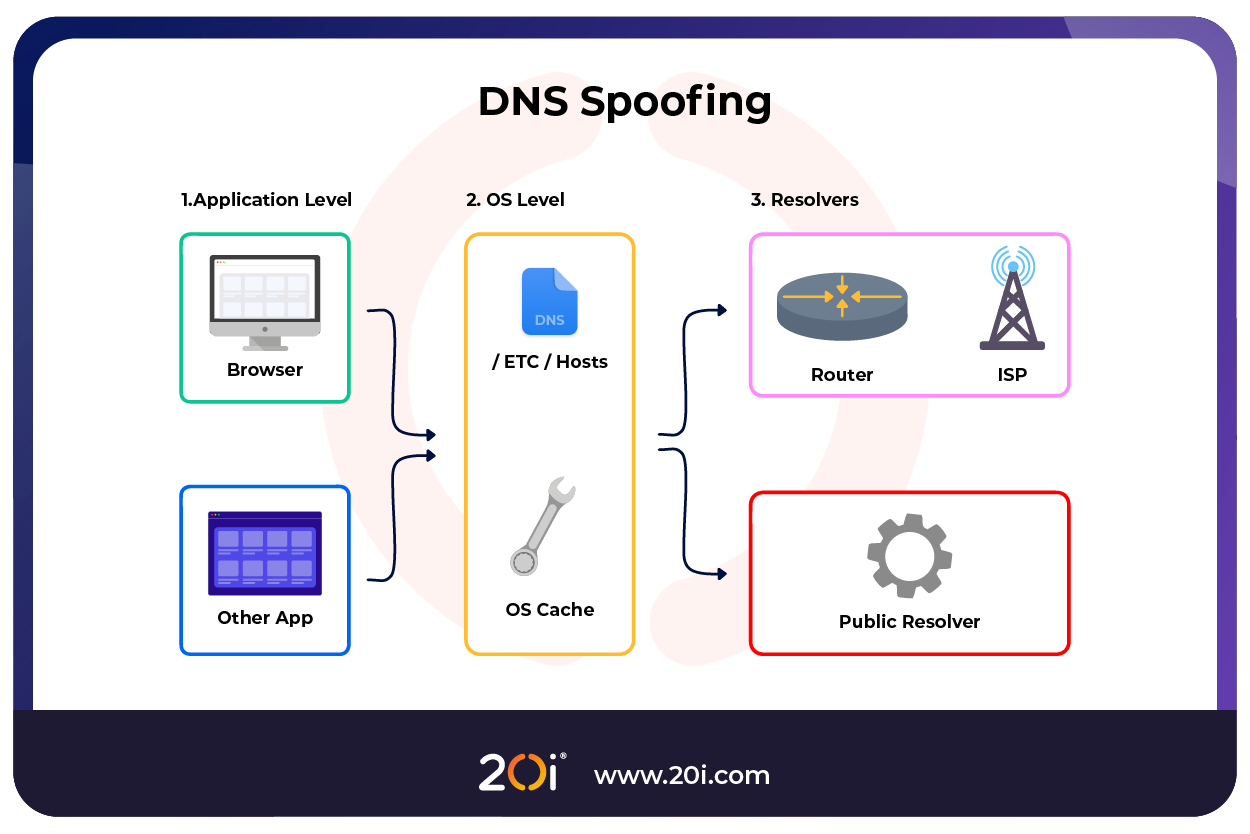
- Browser cache – Most modern browsers store DNS records for a short period of time.
- Operating System –If the browser does not have the relevant record, it will query your OS via the system resolver.
- Recursive Resolver Cache (Public DNS or ISP) – ISPs and public DNS resolvers, like Google store their own DNS cache directly from the requested domain’s nameservers. This cache is served on a much larger basis and can be used by anyone using their DNS resolvers.
Benefits of DNS caching:
- Faster website load times
- Reduced DNS server load
- Improved resilience to temporary DNS outages
- Lower latency and bandwidth usage
Concerns with DNS caching:
- Stale or outdated records if the TTL is too long
- Propagation delays when DNS changes are made (like moving to a new server)
- Subject to DNS cache poisoning attacks if not properly secured
DNS Poisoning (Spoofing)
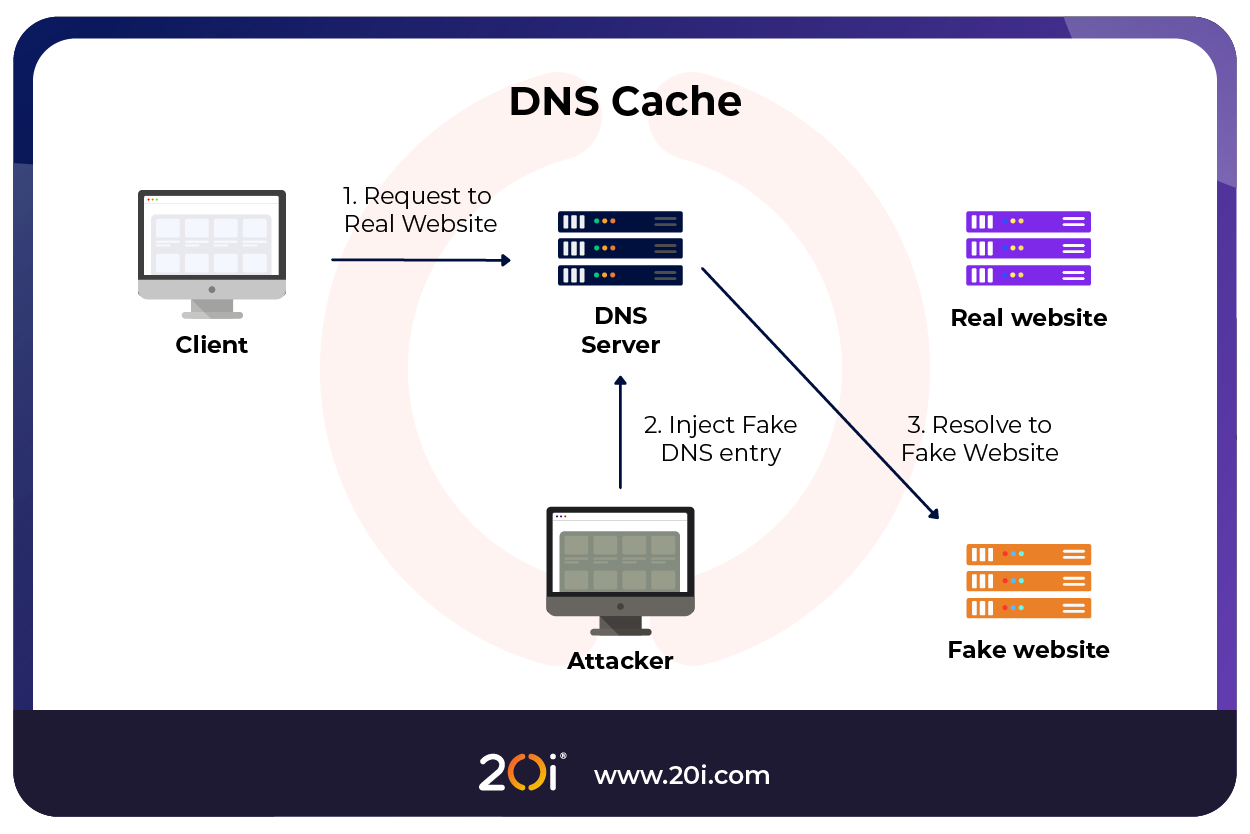
DNS poisoning is when an attacker inserts corrupt DNS data into a resolver’s cache and is how they achieve DNS spoofing.
This causes the DNS server to return an incorrect IP address, redirecting traffic, often to malicious sites.
The attacker can also manipulate the process by sending a forged DNS response to the resolver before the legitimate answer arrives.
If successful, the resolver accepts the fake response and caches it, associating the domain with a malicious IP address.
The fake IP address is cached, and all future requests from users to that domain are sent to the attacker’s server.
DNS Hijacking
DNS Hijacking is where an attacker takes control of DNS settings, either by compromising a DNS server, modifying DNS records, or altering a user’s local DNS configuration.
An attacker can achieve this through different means:
- Router compromise – The attacker gains unauthorised access and changes DNS settings directly on the victim’s router.
- Malware – Installed on the victim’s device to alter local DNS configurations.
- Registrar attack – The attacker gains access to a domain registrar account and changes authoritative DNS records, affecting everyone worldwide querying the domain.
- Man-in-the-middle attack (MiTM) – Attacker intercepts DNS requests directly on a compromised network and responds with false data in real time. This is more common on unsecured Wi-Fi networks, such as free, public Wi-Fi.
DNS poisoning, spoofing and hijacking can have devastating impacts on anyone who falls victim to it.
By redirecting to malicious websites, the attacker can trick victims into entering sensitive data into a seemingly legitimate website.
This data will be sent directly to the attacker and can be used to defraud the victim, steal further sensitive data, or extort the victim later.
Additionally, the malicious website can infect the victim’s computer with malware, causing further damage, data loss, and opening the victim’s computer up for persistent attacks later.
These attacks can also have huge implications for the owners of the manipulated domain. If a company’s DNS was targeted, this can damage the brand reputation and cause a loss of trust with clients.
How to Protect Against DNS Poisoning and Hijacking
How we protect you
At 20i, we don’t believe that you should have to pay extra for security features, so we include an extensive security suite with our Reseller and Managed Cloud Hosting services.
As a reseller, this is something that you can advertise as your own and provide to your customers for free to distinguish yourself from mediocre hosting providers.
DNSSEC
We allow you to enable and configure DNSSEC (Domain Name System Security Extensions). This digitally signs DNS records, ensuring their integrity and authenticity.
Security Patches
We continuously monitor our platforms and implement any security patches long before they can be exploited.
2FA
20i accounts support 2FA (Two-Factor Authentication) through Google and Microsoft authenticators. This can also be enabled and enforced on sub-user and StackCP accounts.
Firewall & Brute Force Prevention
Our firewall will automatically block any known bad actors trying to access a 20i account, and we are continuously updating this list. Our built-in brute force prevention systems will also prevent anyone from trying to brute force their way into a 20i account.
How to Prevent DNS Spoofing & Hijacking
Strong Passwords and 2FA
The first step to minimising unauthorised access to your account is by setting strong passwords with as many characters and variations as are permitted. On top of this, ensure you use 2FA to add an extra layer of protection to your account.
Trusted DNS Resolvers
Only use trusted DNS resolvers, like Google (8.8.8.8), Cloudflare (1.1.1.1), and OpenDNS (208.67.222.222) on your computer. When using trusted DNS resolvers, the likelihood of DNS poisoning or hijacking occurring at the public resolver level decreases significantly.
Virtual Private Networks (VPN)
VPN services ensure that your connection is encrypted from end to end. Using an encrypted connection will greatly reduce the likelihood of a MiTM attack and therefore DNS poisoning and hijacking via these means.
Antivirus and anti-malware software
Using trusted antivirus, anti malware and security software on your computer will greatly reduce the chance of your device being compromised. This will practically eliminate the likelihood of a DNS attack occurring through malware.
Conclusion
DNS poisoning, spoofing and hijacking are huge concerns in the web hosting industry due to the sheer magnitude of the complications they can cause. While we take every measure to ensure you and your content are kept safe, there are also extra precautions that we recommend users to take.
Keeping accounts secure with secure passwords, 2FA, and using our robust platform will give users peace of mind against DNS attacks.