


Whether you’re a web host, an agency or freelancer, winning a new client is only the beginning. The onboarding experience you deliver sets the tone for your entire relationship.
A thoughtful and well guided onboarding process increases customer retention and reduces support overhead.
Here’s how to onboard new hosting customers effectively, and how 20i helps support that process.
Prioritise quick wins
When a customer signs up be sure to send a welcome email that makes them feel valued and includes key information to use your service. This email should include:
- Log in details
- Getting-started resources
- How they can contact you for support
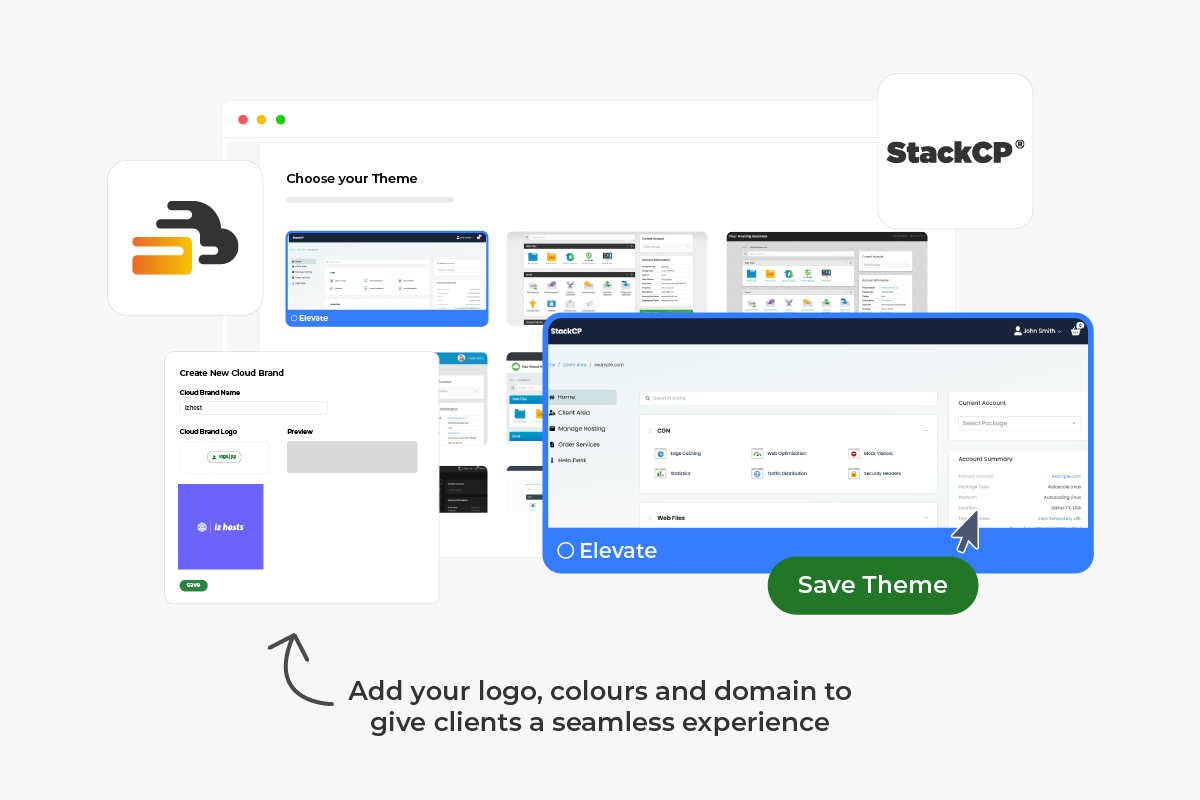
With 20i’s white-label hosting, you can present your own brand at every stage of this interaction ensuring your business remains front and centre.
Small touches like personalisation, acknowledging client goals or introducing your team reinforce trust and position you as a long-term partner rather than just a supplier.
Time to first value
It’s important to consider the time to first value, this is the critical time between a customer purchasing and experiencing their first meaningful benefit.
The faster a customer experiences the value of your service, the more likely they are to keep using the service.
Examples include:
- Registering a domain name
- Migrating their sites from another provider
- Setting up their first mailbox
- Installing WordPress
You can help your customers by offering guided tutorials, tailored to their specific role or goals.
This will directly impact client retention and satisfaction. Waiting too long often leads to abandonment.
Read our step-by-step guide to creating and sending email campaigns as a 20i reseller.
Verify and Setup the Account
A smooth setup process will prevent frustration and ensures your customers can access the full range of features.
Typical setup steps include how to connect or transferring domains, how to create professional email accounts and configuring hosting environments.
Our control panel, StackCP, is built specifically to streamline these tasks, enabling you to manage multiple client environments from a single intuitive interface.
For agencies migrating from traditional cPanel setups, the performance and usability improvements reduce time spent on routine administration.
Offer step-by-step guides, annotated screenshots, or short video walkthroughs that explain where key tools and settings are located. By giving customers confidence in accessing and managing their hosting account, you reduce initial confusion and support requests.
Offer Essential Resources
Providing clients with clear resources and the right information allows them to solve problem independently and reduces the support burden on you.
Consider providing:
- Knowledge base articles: Cover common topics and create detailed, step-by-step guides that cover potential pain points.
- Video tutorials: Short, visual guides are especially effective for non-technical users.
- FAQs: Curate answers to the questions most frequently asked by new customers.
Behind the scenes, 20i supports you with an extensive knowledge base and technical resources that your team can draw from. This allows you to focus on client relationships while relying on our infrastructure and expertise to back you up when needed.
Assist with Website Migration
Many customers are either moving their website from another host or launching a site for the very first time, and offering guided assistance during this phase can be crucial for many.
At 20i, our automated migration centre streamlines migrations in one-click, so you can move clients efficiently and get them live without unnecessary delays.
We also provide built-in security and backup capabilities, so ensure you make your customers aware of all the security benefits offered.
Selling Add-ons
Once the customer’s website is live, it’s important to introduce key features and add-ons that set your hosting apart. Upselling acts as a benefit for not only your customer, but also for you. Learn how to upsell and cross-sell effectively here.
Highlighting key add ons early helps users understand the full value of your platform and encourages them to explore additional tools.
Resellers can enhance their offering through services such as:
🔒 Advanced Security Suite
By guiding new users through these features in a clear and approachable way, whether through tutorials, guided tours, or in-dashboard prompts, you encourage them to maximise the value of your service.
You can offer these add-ons under your own white-label branding, helping to increase your revenue per client, while improving their hosting experience.
Engagement and Support
A customer who feels they can easily engage and connect with you, particularly when problems arise, are more likely to remain loyal for the long run.
Make it simple for customers to interact with your team and wider user community by clearly highlighting the support channels available to them early on and make all your support options visible within the dashboard.
Beyond direct support, fostering a sense of community can add significant value. Forums, Slack or Discord channels where customers can share experiences, exchange practical tips, and learn from one another can be really helpful and reduce reliance on formal support channels.
Regular communication, through sharing updates, performance tips or security advice will keep clients engaged and reinforces your value beyond hosting alone.
When customers know help is easily accessible, they’re more likely to stay engaged, buy into add-ons additional, and build long-term trust in your service.
Gather Feedback
The first few weeks of a customer’s journey are critical for retention. This early period often determines whether they feel confident and supported or frustrated and uncertain in your business.
How can we help?
Be proactive and follow up with them to help identify friction points, understand their experience, and find opportunities to improve your onboarding process.
It’s important to do this soon after a customer signs up. Follow up with a progress update email within their first week to check how they’re getting on and whether they’d like to speak with the support team about anything. Taking this proactive approach can significantly reduce churn.
Customer surveys
One approach is to survey their experience. Ask questions about account setup, website migration and overall satisfaction with your platform and support.
Keeping surveys short and focused increases response rates while still providing valuable insights. Even a simple check-in email can be effective at gathering key feedback.
Analyse pain-points
It’s equally important to analyse pain points revealed through this feedback.
Start by categorising responses into common themes (setup issues, usability, billing or support queries), then look for recurring patterns such as repeated questions, delays in key onboarding steps or points where customers disengage.
Tracking how often issues appear and reviewing support tickets or survey responses can help prioritise what to address first. Addressing these areas helps streamline the experience for future users.
For example, at 20i, we use our customer feedback form to identify areas where we can improve and then let the customer(s) know when we’ve implemented an idea they have shared with us.
Final Thoughts
A thoughtful onboarding process transforms first-time users into satisfied customers who will stay for the long run.
At 20i, we provide the white-label platform, control, performance and support that enable you to onboard clients confidently and scale your hosting business without compromise.
By guiding them through setup, highlighting key features and offering support at every stage, you’ll build trust, reduce churn and set the foundation for long-term relationships.