


Many hosting providers advertise daily backups as a standard feature. But that label alone does not explain how backups are created, where they are stored or how quickly they can be restored when something goes wrong.
We’ll look at how traditional web hosting backups work, where they can fall short, and how 20i Timeline Backups is designed to make protection and recovery simpler.
How Most Web Hosting Backups Work
Many web hosting backup systems are designed to create portable copies of hosting accounts that can be restored or moved between servers.
During a backup job, the system collects data from a hosting account and packages it into one or more archive files. Depending on the provider and product, this may include:
➡️ Website files
➡️ Database exports
➡️ Email accounts and mailbox data
➡️ DNS configuration
➡️ Cron jobs
➡️ SSL certificates
➡️ Account settings and other metadata
The resulting archives are then copied to the provider’s configured backup location. A typical backup job follows these steps:
- The system reads files across the hosting account.
- It generates database exports.
- It collects email data and account configuration, where included.
- It compresses the collected data into backup archives.
- It copies those archives to backup storage.
This can work well for smaller accounts. However, as a website accumulates more files, databases and email data, creating and restoring backups can become more time-consuming.
In the most hosting setups, backup management is tied to the individual server hosting the account. This can make it harder to manage protection consistently when websites and services are spread across multiple servers or environments. Not every provider uses this model, but it is a common source of added complexity for customers managing multiple hosting products.
Limitations of Traditional Backups 📉
Backups can take longer as accounts grow
A website containing hundreds of thousands of files may take a considerable amount of time to scan, collect and compress.
A backup is not necessarily an immediate copy of an account at a single moment. Depending on the amount of data and the provider’s infrastructure, the job may take minutes or hours to complete.
Backup creation uses server resources
Creating compressed backup files requires CPU, memory and disk I/O. Every file must be read from storage and written again into an archive.
To reduce the potential effect on customer websites, providers commonly schedule these jobs during quieter periods.
Live data can continue changing
Websites remain active while a backup job runs. Visitors may be placing orders, uploading images, receiving email or updating content during that period.
Database exports are usually created with consistency in mind, but files can still change while the job is in progress. As a result, a backup may represent data collected over a backup window rather than a single selected recovery point.
Backups can be managed separately by server
In some hosting environments, backups are managed separately on each server rather than through a central platform.
As websites, databases and email services are spread across different environments, this can mean using multiple tools or control panels to check protection, locate recovery points and start restores.
Restoration can mean rebuilding an account
Restoring from a backup archive usually involves multiple steps:
- Locating the appropriate backup archive.
- Downloading or accessing it from backup storage.
- Extracting its contents.
- Restoring website files.
- Importing databases.
- Recreating mailboxes and account settings where applicable.
- Reapplying configuration.
For larger accounts, this process can take substantially longer than restoring from a storage-level snapshot.
How 20i Timeline Backups Differs ⭐
Timeline Backups is designed around recovery rather than archive management. It uses storage-level snapshots to provide recovery points without requiring customers to manage backup files directly.
Timeline Backups
Live data → Snapshot → Recovery point → Restore
Traditional Backups
Data → Archive → Storage → Find archive → Extract → Restore
One place to manage protection and recovery
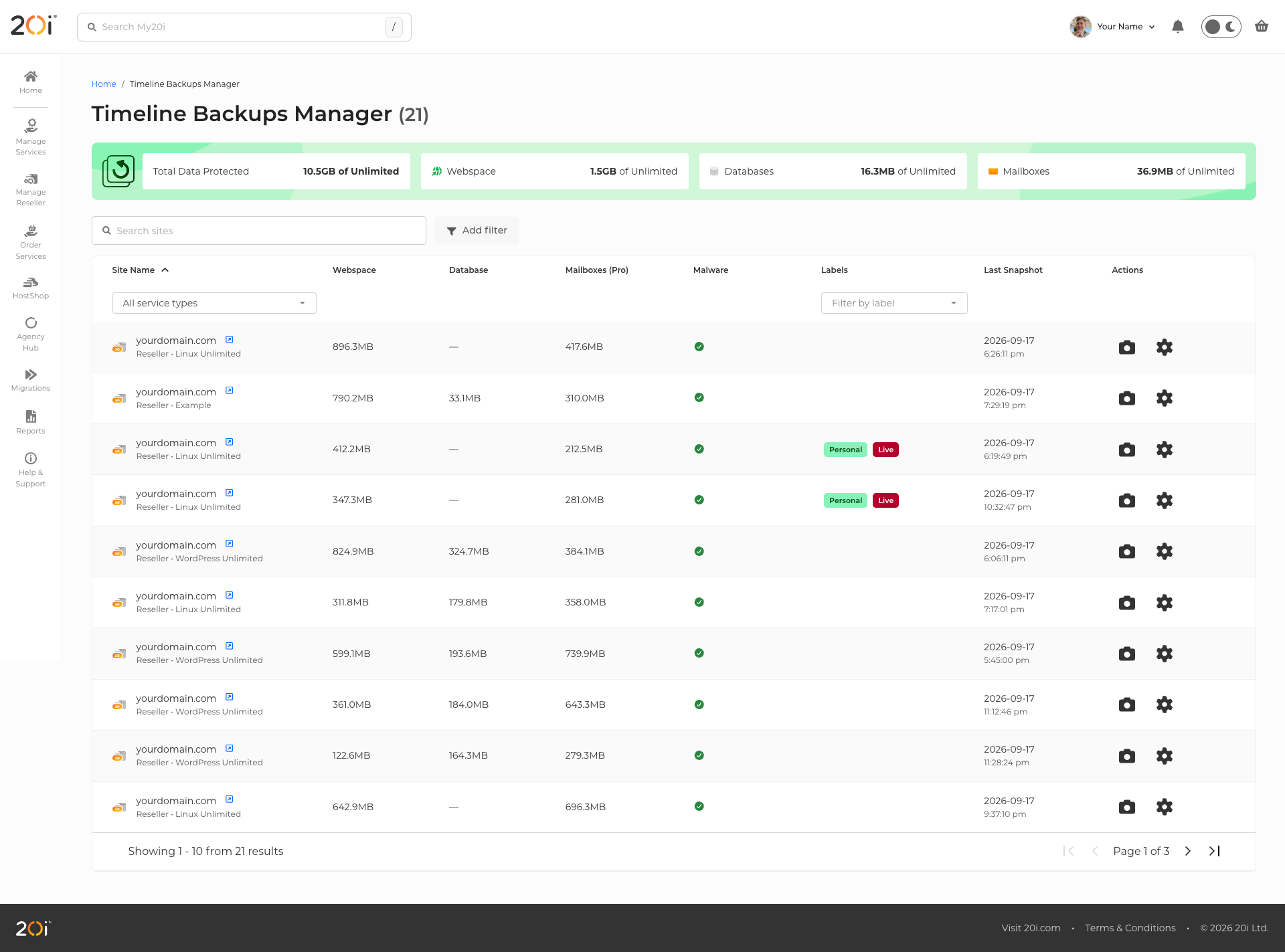
Timeline Backups brings supported products together in the Timeline Backups Manager.
Rather than switching between separate servers or control panels, customers can view and manage available backup protection from one interface.
Clearer visibility
With conventional backup arrangements, it is not always immediately clear which products are protected or when a usable recovery point was last created.
Timeline Backups provides visibility of backup status and available recovery points, helping customers identify products that are protected and those that still need backup coverage.
A consistent recovery workflow
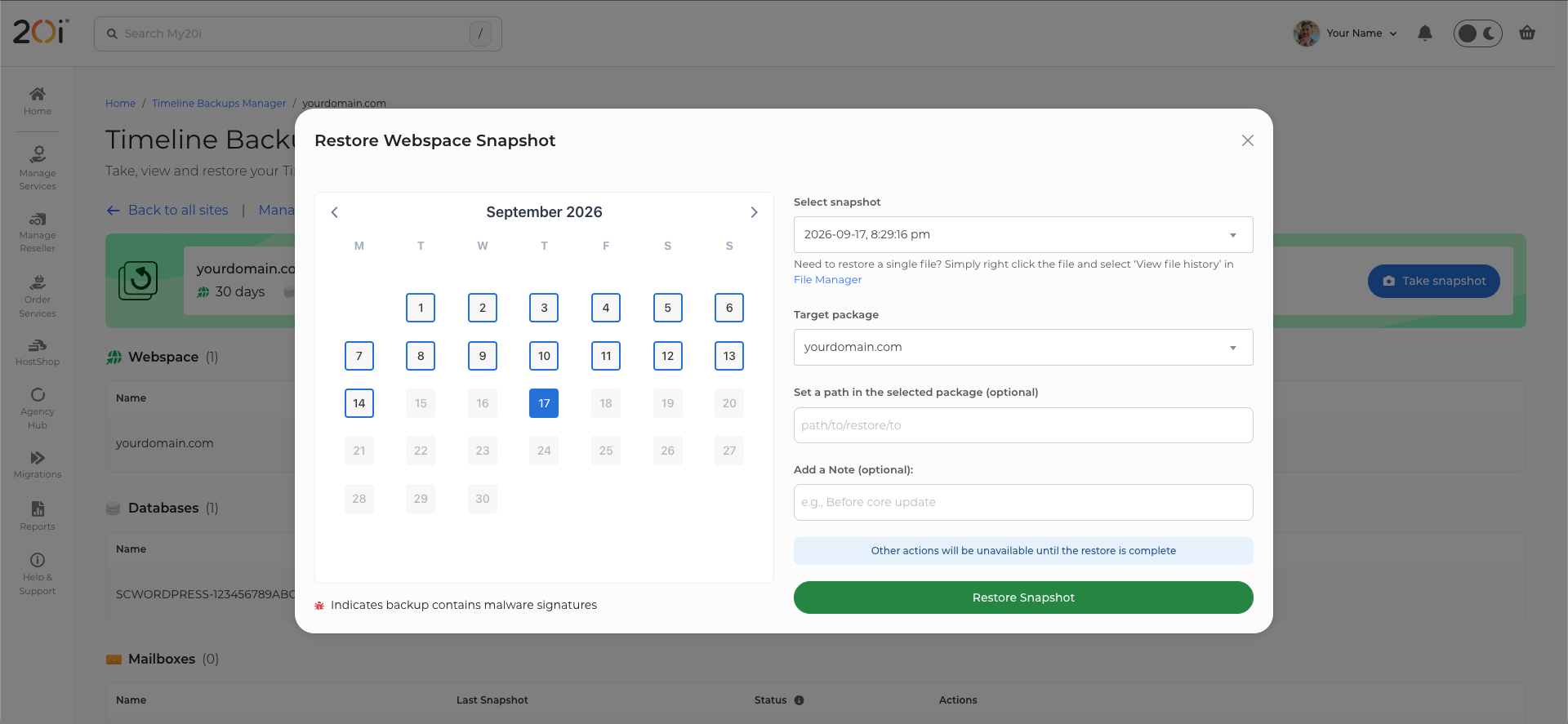
Hosting environments can span multiple servers and products. Timeline Backups provides a consistent process across supported services: select the product, choose an available recovery point and begin the restore process.
Customers do not need to locate backup files, extract them or work through separate restoration tools.
Off-site protection
Backup data is stored separately from the live hosting environment, providing an additional layer of protection if the primary server experiences a hardware issue or outage.
Separating backup storage from production infrastructure helps ensure recovery points remain available when they are needed.
Snapshot-based recovery points
Unlike conventional backup jobs that must read and compress account data into backup files, Timeline Backups uses storage-level snapshots.
This avoids the archive-creation process associated with conventional backup jobs and is designed to reduce the operational overhead on the live hosting environment.
Recovery built into the platform
With Timeline Backups, recovery is based on selecting an available snapshot rather than finding and rebuilding from an archive.
This provides a simpler path to restoring supported product data to a chosen recovery point.
Backup history with context
Notes can be added to snapshots and restore operations, helping to create a clearer audit trail around important changes and recovery events.
Native 20i integration
Timeline Backups is developed and maintained by 20i as part of the hosting platform.
This enables close integration with our infrastructure and allows us to continue improving the backup experience without relying on external backup plugins or extensions.
Timeline Backups at a Glance
See how traditional backups compare directly to 20i’s Timeline Backups:
| Traditional Backups | 20i’s Timeline Backups |
| Archive-based backups | Storage-level snapshots |
| Account-centric | Product-centric |
| Backup creation can take time | Instant snapshots |
| Restores rebuild the account | Restore directly to a point in time |
| Managed per server | Managed from a single interface |
| Limited recovery context | Snapshot and restore notes |
| Backup created over time | Consistent point-in-time recovery |
| Often relies on third-party software | Native 20i platform |
Final Thoughts
Single-server web hosting backups were designed for a very different era. Their archive-based approach works well for account migration and portability.
As websites have grown larger and more dynamic, however, that same approach can lead to longer backup windows, increased resource usage, and slower recovery times.
Our Timeline Backups takes a different approach. By using storage-level snapshots and integrating backup management directly into the 20i platform, it simplifies both protection and recovery. Instead of managing backup archives and server configurations, you simply choose the product you want to protect or restore, and the platform handles the rest.