


In the web hosting industry, security breaches rarely start with someone “hacking” their way into the servers.
Far more often, they begin with attacks on the individual, by stealing login credentials or brute force entry.
Whether you’re a website owner managing a single site or a reseller responsible for your customer’s accounts, your hosting credentials are one of the most valuable targets an attacker can find.
In this post, we will explore different password-based attacks, how they work, common targets and how to keep your accounts safe.
Why Hosting Accounts Are a High-Value Target
Most attacks are automated by bots, continuously scanning the internet for weak credentials or purchasing leaked credentials sold on the dark web.
These types of attacks are indiscriminate; being a small site or a small business does not reduce the risk. A single hosting account can provide access to:
- Website files and databases
- Client information
- Email accounts
- DNS and domain settings
- Backups
- Other customer accounts (in the case of resellers)
For attackers, compromising one login can mean full control of a website or an entire reseller environment.
Attackers don’t need to “break in” if they can simply log in using your credentials. Common targets include:
- Hosting control panels
- WordPress admin logins
- FTP/SFTP accounts
- GitHub accounts
- Email accounts tied to the domain
Once access is gained, attackers can steal information, upload malware, redirect traffic, send spam, pivot to other accounts and change personal information to complicate the process of recovering your account.
Common Password Attacks Seen in Hosting Environments
Password attacks comprise a range of techniques that aim to obtain valid credentials rather than exploit software vulnerabilities.
In hosting environments, these attacks are largely automated and target exposed authentication points such as control panels, CMS logins, and email services.
Brute-Force Attacks
Automated systems attempt thousands of password combinations in a short time. Short or simple passwords are quickly cracked, especially where login attempts are not restricted.
Many website owners will implement preventative measures such as enforcing CAPTCHA (Completely Automated Public Turing test to tell Computers and Humans Apart) or limiting login attempts.
On our secure hosting platform at 20i, brute force prevention is included, configured, and enabled automatically as part of StackProtect security suite.
Dictionary Attacks
Instead of random guesses, attackers use lists of common passwords and predictable patterns such as Spring2025! or CompanyName123. This can be surprisingly effective, even in 2026.
Credential Stuffing
This is one of the most effective attack methods. Attackers use email/password combinations leaked from unrelated data breaches and try them against hosting services, relying on credential reuse.
Rainbow Table Attacks
Most passwords are stored in a hashed format, usually with the MD5 (Message Digest 5) and SHA1 (Secure Hashing Algorithm 1) cryptographic hashing function. When in this hashed state, the passwords are unreadable and therefore unusable.
Where weak hashing or short passwords are involved, precomputed tables, known as rainbow tables, can be used to rapidly ‘reverse’ stolen password hashes.
While impossible to ‘reverse’ a password hash, attackers will have a table of known passwords and associated hash values. Tools will match the stolen password hash to a known password hash in the table.
How Strong, Unique Passwords Reduce Risk
Strong passwords significantly slow down and often completely stop automated attacks due to the time and computational power investment required.
Best practices include:
- Using long passwords (length matters more than complexity)
- Never reusing passwords across services
- Using a password manager to generate and store unique credentials
- Avoiding predictable patterns or minor mutations of old passwords (e.g. Password123 to Password 1234!)
For resellers, this is especially important. One weak master password can expose multiple customer environments.
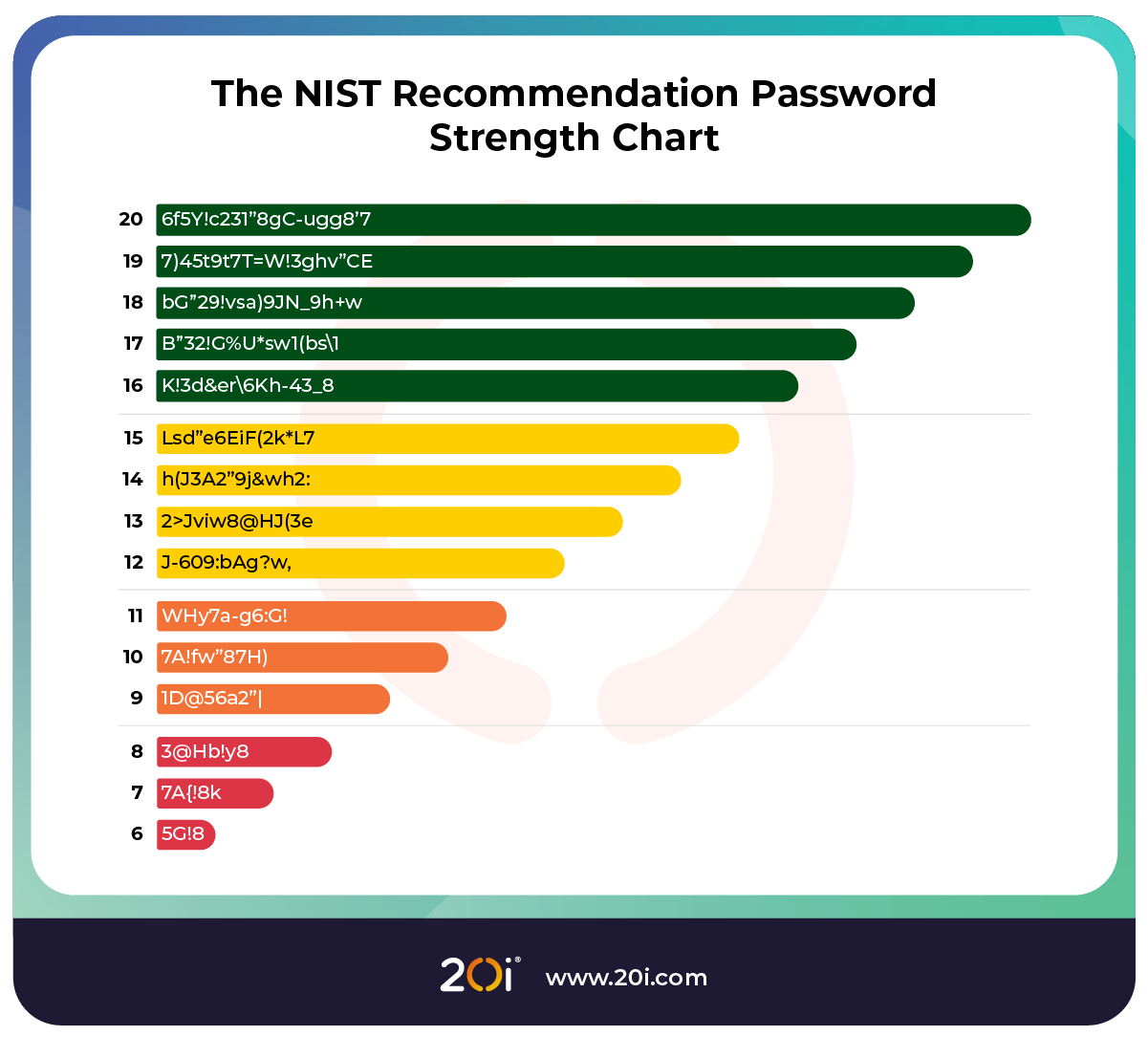
NIST (National Institute of Standards and Technology) recommends aiming for 16 characters with a mixture of uppercase & lowercase letters, numbers and special characters.
Why Passwords Alone Are No Longer Enough
Many people reuse the same passwords or mutated versions of their main password across different services.
If an illicit actor comes to possess your credentials for a specific website, they will then try the same credentials across multiple other services, such as banking applications.
If using the same credentials, a single account breach can evolve into multiple accounts being compromised, increasing potential damage and making it more difficult to recover accounts
Even long, complex passwords can be reused across services, stolen via phishing and exposed through third-party breaches.
Once an attacker has the correct password, there is nothing stopping them from logging in and causing damage unless another layer of protection exists.
How MFA Stop Attacks
Multi factor authentication adds additional requirements beyond the password that can be categorised as:
- Something you know – a password or PIN
- Something you have – a phone, hardware token, or authenticator app
- Something you are – biometrics like a fingerprint or facial recognition
This means:
- Stolen or reused passwords are no longer enough
- Automated attacks fail at the second step
- Phished credentials cannot be used without physical access to the device or biometric data
Many 2FA apps also allow you to lock access to the app behind a pin, facial recognition or fingerprint, adding further security to your accounts in the chain.
At 20i, we allow the use of Google, Microsoft, Authy, AuthenticatorCC, Ente, 2fast, 2stable Authenticator, Raivo and more.
If you’d prefer a different app, our 2FA system is compatible with all standard TOTP (Time-based One-Time Passcode) apps.

What Users Should Secure First
If you manage a single website, prioritise:
- Hosting control panel access
- WordPress admin accounts
- Database user accounts
- Email accounts associated with the domain
- FTP/SFTP credentials & adding whitelists where applicable
For resellers, the impact is broader. You should prioritise:
- Strong, unique passwords for all admin and team member accounts
- WordPress admin accounts
- Database user accounts
- MFA enabled & enforced on StackCP users
- FTP lock is enabled or an effective whitelist is in place
- Enforce the principle of least privilege (PoLP)
- Regular audits of who has access and at what level
One compromised reseller login can affect many, potentially all, customers at once.
Automated attacks do not discriminate; enabling MFA takes far less time than recovering a compromised account and prevents irreparable damage.
Conclusion
Strong passwords and MFA are not advanced security features; they are crucial protections in modern account security.
For end users, they protect your website and data.
For resellers, they protect your customers, your reputation, and your business.
A few minutes spent strengthening credentials can prevent hours or days of cleanup later. We recommend that you conduct and audit, review your passwords and enable MFA wherever possible.
We also recommend reading up on the most common cyber threats in the hosting industry.